
If you run a small business here, you have probably typed some version of "how much does a website cost in Colorado Springs" and gotten answers that range from "free" to "it depends." This guide gives you real numbers and the reasons behind them.
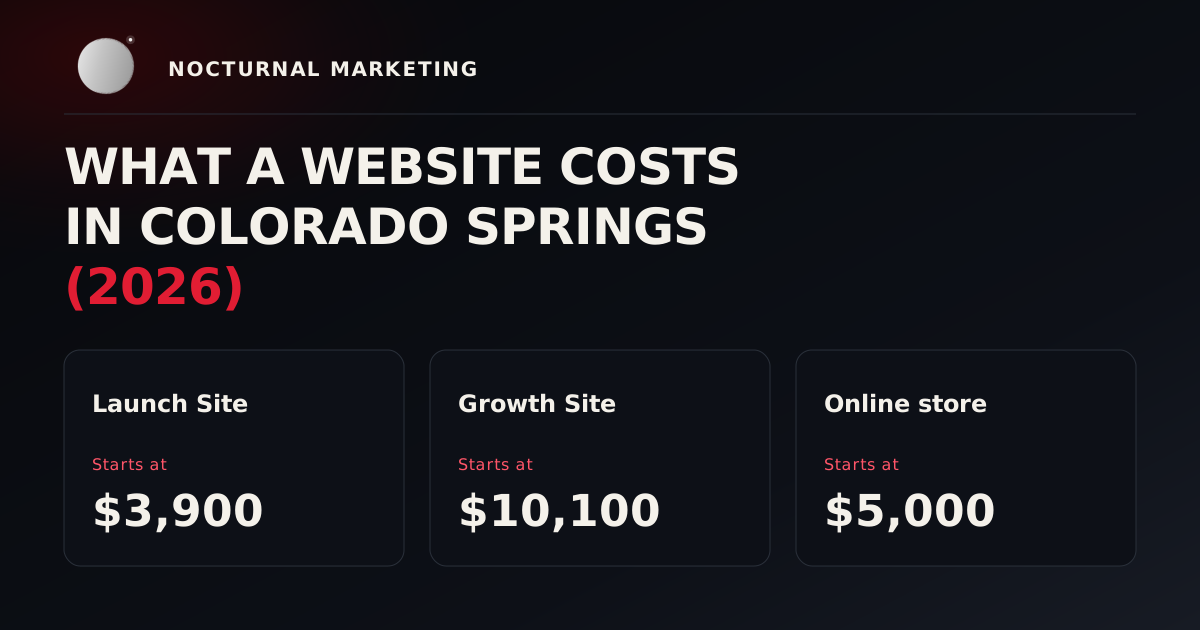
The short answer: at Nocturnal Marketing, a Launch Site starts at $3,900, a Growth Site starts at $10,100, and an online store starts at $5,000. Those are starting prices, published on our pricing page. Your written quote locks the scope and price before any work starts.
The rest of this guide covers what each price buys, what moves a project up or down from there, and when you should skip a custom build and use a website builder instead.
The starting prices, in plain words
These come straight from our pricing page.
Launch Site, starts at $3,900. Up to 5 pages, with a wireframe, design mockups, a template build, a responsive layout that works on phones and desktops, and a contact form that reaches you. It is tested against written acceptance criteria before launch.
Growth Site, starts at $10,100. 5 to 10 pages, with full design, a custom front end, a CMS your team can edit, and an SEO foundation. It is also tested against written acceptance criteria before launch.
Online store, starts at $5,000. Platform selection, store setup, product listing, and payment integration. Before launch, a test order is placed and checked.
There are no long-term contracts. Projects are fixed-scope and priced up front, and ongoing services such as SEO, Google Ads, and social media management run month to month.
Why "starts at" matters
A starting price is the floor for that package. Your final bill depends on what your site actually has to do. That is why we write the scope down before work begins. You see the price, you see what it covers, and the two are locked together in writing.
What moves the price?
Here is the short version of what usually moves a project up or down from a starting price. The next two sections explain each item.
Pushes it up
- More pages
- A custom design
- Editing on your own
- Forms that have to reach a system
- Selling online
- Work beyond the website
Keeps it down
- Start with fewer pages
- Have your content ready
- Use a template where it fits
- Keep integrations to the ones you use
- Decide who signs off
What pushes the cost up
These are the things that can move a small business website design project in Colorado Springs above its starting price.
More pages. A Launch Site covers up to 5 pages. Once you need more than 5 pages, you are in Growth Site territory, which covers 5 to 10 pages.
A custom design. A Launch Site uses a template build. A Growth Site includes full design and a custom front end, which takes more time to plan and build.
Editing on your own. If your team wants to update pages without calling anyone, you need a CMS set up for that. That is part of the Growth Site.
Forms that have to reach a system. A contact form that sends to your inbox is simple. A form that has to create a record in your CRM, keep the source of the lead, and alert the right person takes more work, and it needs testing. We wrote about why this matters in "Why website leads go nowhere."
Selling online. A store adds platform setup, product entry with photos, prices, and options, and a working checkout. A large catalog with many options takes longer to enter and check than a small one.
Work beyond the website. Photography, video, logo work, and ongoing SEO are separate services with their own prices. Content and video are priced per format. Ask what page copy your written scope includes.
What keeps the cost down
Start with fewer pages. Five clear pages that answer your customers' real questions are a solid start. You can add pages later.
Have your content ready. If your service descriptions, photos, hours, and contact details are ready before the project starts, there is less to chase.
Use a template where it fits. A Launch Site is built on a template on purpose. If your pages are standard, you may not need a custom front end.
Keep integrations to the ones you use. Connect the form to the place your leads actually go. Skip connections nobody will check.
Decide who signs off. One person who can approve the mockups keeps revisions short.
When a cheap website builder is honestly fine
Sometimes the right answer is a do-it-yourself builder like Squarespace or Wix, and we would rather say so up front.
A builder is a good fit when your site mostly needs to publish, explain, capture, and route. That usually means:
- Standard pages: services, about, contact, a few articles.
- Built-in forms, booking, or checkout cover what you need.
- Your staff want to make visual edits more often than structural changes.
- You are comfortable with the platform's hosting, export, and account rules.
- Getting online quickly matters more than custom behavior.
A local service business does not need to fund a custom system just to publish six service pages, a contact form, and one article a month.
If you go the builder route, do a short check before you call it done. Send a test form and confirm it reaches you. Check that you own the domain and can recover the account. Know what you can export if you ever move, and who gets the renewal notices.
When it makes sense to pay for more
A custom build earns its cost when the website has to do something specific to your business that a builder cannot handle cleanly. Examples include pricing or eligibility rules, multi-step intake forms that save progress, customer or staff logins, or a deep connection to the systems you run the business on.
It also makes sense when you have already outgrown a builder, or when leads keep going missing between the form and the person who should answer them.
Compare the three-year cost
The cheapest launch can become the most expensive site to own. Before you choose, add up the full picture over about three years:
- Setup: who writes, designs, builds, and tests the first version.
- Subscriptions: the plan you will need once real traffic, staff, or orders show up.
- Add-ons: apps, plugins, or connectors you end up needing.
- Transaction fees: payments, bookings, or orders.
- Upkeep and support: who fixes things when a form or checkout breaks.
- Staff time: hours spent copying data or chasing lost leads.
- Moving later: what content, links, and data can move cleanly.
Exact forecasts are impossible. The goal is to see the hidden costs before you sign anything.
Questions to ask any web designer before you pay
- What exactly is included in this price, in writing?
- How many pages, and how many rounds of changes?
- Who owns the domain, the site, and the accounts when we are done?
- How will you test the contact form before launch?
- What happens, and what does it cost, if I need help after launch?
A clear answer to each one tells you more than a low number on its own.
Frequently asked questions
See every starting price
Our starting prices are all on our pricing page, along with what each one buys. If you are not sure which fits, tell us what you need. You will get back a written scope and price, or a plain answer that it isn't a fit.


